
Appearance
Setup
The game components (walk, fly, npc-walk, game-view) rely on A-Frame together with a physics engine and a set of animation/loader helpers. Because these libraries are not bundled with Spatial Design System, you need to load them yourself before importing any game component.
All required dependencies ship as UMD builds that register globals (AFRAME, Ammo, etc.) on window. The recommended way to install them is via <script> tags in your HTML, so they are available synchronously before A-Frame parses the scene.
⚠️ Set up a fresh project for game components
The game components currently require a different dependency-loading strategy than the one described in the Quick Start. Instead of pulling A-Frame, ammo.js and the physics system through npm, they must be loaded as UMD <script> globals (see below). Mixing both approaches in the same project leads to duplicated A-Frame instances and runtime errors, so we recommend starting a new project from scratch when you want to use the game components, rather than retrofitting the setup from the Quick Start.
Vite is still required to develop and build the project — only the four libraries below are loaded from a CDN instead of being installed via npm. Everything else (Spatial Design System, your own source code, build tooling) continues to be managed by Vite and package.json as usual. See Installation for how to install Vite and create the project.
Required dependencies
| Library | Purpose |
|---|---|
| A-Frame | Core WebXR / 3D scene framework. |
| aframe-extras | Animation mixer, GLTF helpers and additional controls used by the game components. |
| ammo.js | Bullet physics engine compiled to WebAssembly. Required by walk, fly and any entity using ammo-body / ammo-shape. |
| aframe-physics-system | A-Frame bindings that expose Ammo to the scene through the physics component. |
HTML setup
Add the following scripts to the <head> of your page in this order. The order matters: aframe must be available before its extras and physics bindings register their components, and ammo.wasm.js must be loaded before aframe-physics-system initializes the Ammo driver.
html
<head>
  <!-- A-Frame -->
  <script src="https://aframe.io/releases/1.7.0/aframe.min.js"></script>

  <!-- A-Frame helpers (animation mixer, loaders, controls) -->
  <script src="https://cdn.jsdelivr.net/gh/c-frame/aframe-extras@7.5.4/dist/aframe-extras.min.js"></script>

  <!-- Ammo.js physics engine (WebAssembly build) -->
  <script src="https://cdn.jsdelivr.net/gh/MozillaReality/ammo.js@8bbc0ea/builds/ammo.wasm.js"></script>

  <!-- A-Frame bindings for Ammo -->
  <script src="https://cdn.jsdelivr.net/gh/c-frame/aframe-physics-system@v4.2.3/dist/aframe-physics-system.min.js"></script>
</head>
Why UMD scripts?
A-Frame registers components on a single global AFRAME instance the moment it is loaded. Loading A-Frame (or any of its plugins) a second time through a bundler causes duplicate component registration and runtime errors such as NotSupportedError: <a-node>. Using the prebuilt UMD scripts guarantees a single shared instance across your app and all SDS game components.
Enabling physics on the scene
With the scripts in place, enable the Ammo driver on the <a-scene> element. All game components that depend on physics expect this to be present:
html
<a-scene physics="driver: ammo; debug: true;">
  <!-- entities using ammo-body, ammo-shape, walk, fly, ... -->
</a-scene>
Set debug: true during development to visualize collision shapes.
Importing SDS game components and using them
Once the globals are in place, import the SDS components you need. They self-register on AFRAME, so a side-effect import is enough. Them, you can use them in your scene.
If you have the default Vite project, replace the whole main.js with:
js
import 'spatial-design-system/components/game/walk.js';
import 'spatial-design-system/components/game/fly.js';
import 'spatial-design-system/components/game/npcWalk.js';
import 'spatial-design-system/components/game/gameview.js';

document.querySelector('#app').innerHTML = `
<a-scene physics="driver: ammo; debug: true;">
    <!-- Ground -->
    <a-box width="20" height="0.2" depth="20" ammo-body="type: static;" ammo-shape="type: box;" color="green"></a-box>
    <!-- Fox -->
    <a-entity
      walk="sprint: true;"
      id="player"
      ammo-body="type: dynamic; angularFactor: 0 0 0; activationState: disableDeactivation;" position="0 1.8 0"
    >
        <a-entity gltf-model="/Fox.glb" ammo-shape="type: hull;" position="0 -1.3 0.2" scale="1 1 1" ></a-entity>
    </a-entity>
    <!-- Camera -->
    <a-entity camera game-view="target: #player; type: thirdPersonFollow;"></a-entity>
</a-scene>
`
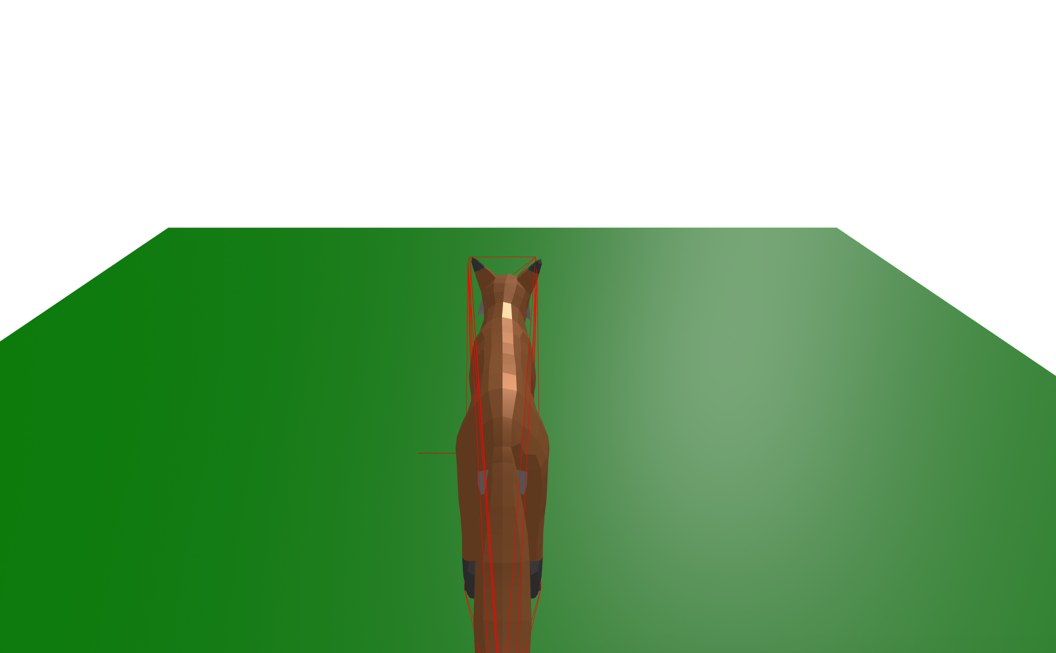
You should see a fox with a camera behind it. Use WASD to move the fox.
Common pitfalls
- Loading A-Frame from a bundler. Importing
aframefrom npm in addition to the script tag will register components twice. Either use only the UMD script (recommended for game projects), or aliasaframein your bundler to the global instance. - Missing
physicson<a-scene>. Withoutphysics="driver: ammo",ammo-bodyandammo-shapeare no-ops andwalk/flywill not move. - Wrong script order.
aframe-physics-systemreads theAmmoglobal at init time — loadammo.wasm.jsbefore it. - Serving from
file://.ammo.wasmrequires a real HTTP origin to fetch the.wasmbinary. Use a local dev server.