
Appearance
game-view
The game-view component controls the camera in an A-Frame scene. It supports multiple camera modes like fixed, third-person, and rotating views. The component also supports zoom.
⚠️ Project setup required
The game-view component relies on A-Frame, ammo.js and the physics system, which must be loaded as UMD globals before use. Follow Game components — Setup to prepare a fresh project before continuing.
Import
Once the project setup is in place, side-effect import the component so it self-registers on AFRAME:
js
import "spatial-design-system/components/game/gameview.js";Example: thirdPersonFollow type
Camera follows the player and rotates with it. The target must be set.
html
<a-entity camera
  game-view="
    target: #fox-character;
    type: thirdPersonFixed;
  "
></a-entity>
Example: thirdPersonFixed type
Camera follows the player but keeps the same world direction. The target must be set.
html
<a-entity camera
  game-view="
    target: #fox-character;
    type: thirdPersonFollow;
  "
></a-entity>
Quick start (How it works)
Camera Type (type):
- Defines the camera behavior mode (default value:
thirdPersonFollow).thirdPersonFollow: Follows the target and automatically rotates with it.thirdPersonFixed: Follows the target but does not rotate with it.quarterTurn: Follows the target but rotates in 90-degree steps based on user input.fixed: Static camera at a set position and rotation.- For this type, jump to the fixed section below for specific settings.
html
<a-entity camera
  game-view="
    type: thirdPersonFollow;
  "
></a-entity>
Target:
target: CSS selector for the entity the camera should follow (default value:null).- NOTE: Required for
thirdPersonFixed,thirdPersonFollow, andquarterTurn.
- NOTE: Required for
html
<a-entity camera
  game-view="
    target: #fox-character;
  "
></a-entity>
Camera Positioning:
distance: Horizontal distance from the target (default value:5).height: Vertical height above the target (default value:5).tilt: Vertical camera angle/tilt in degrees (default value:-20).
html
<a-entity camera
  game-view="
    distance: 5;
    height: 5;
    tilt: -20;
  "
></a-entity>
Zoom:
zoom: Enables zooming with the mouse wheel for target-following cameras (default value:false).
html
<a-entity camera
  game-view="
    zoom: true;
  "
></a-entity>zoomSpeed: Speed of the zoom effect (default value:0.3).
html
<a-entity camera
  game-view="
    zoom: true;
    zoomSpeed: 0.3;
  "
></a-entity>minDistance: Minimum zoom distance from the target (default value:2).maxDistance: Maximum zoom distance from the target (default value:15).minHeight: Minimum camera height when zooming (default value:2).maxHeight: Maximum camera height when zooming (default value:15).minTilt: Camera tilt (in degrees) when fully zoomed in, atminDistance(optional, disabled by default). When set together withmaxTilt, the tilt is interpolated across the zoom range instead of staying fixed attilt. Useful for showing a wider, more top-down area when zooming out.maxTilt: Camera tilt (in degrees) when fully zoomed out, atmaxDistance(optional, disabled by default). Remember that more negative values tilt the camera further toward a top-down view.
html
<a-entity camera
  game-view="
    zoom: true;

    minDistance: 2;
    maxDistance: 15;

    minHeight: 2;
    maxHeight: 15;

    minTilt: -20;
    maxTilt: -50;
  "
></a-entity>
Quarter-Turn Rotation:
- NOTE: Only applies to the
quarterTurntype. rotationSpeed: Speed of the 90-degree rotation step (default value:5).
html
<a-entity camera
  game-view="
    type: quarterTurn;
    rotationSpeed: 5;
  "
></a-entity>keyTurnLeft: Key to rotate the camera left (default value:q).keyTurnRight: Key to rotate the camera right (default value:e).
html
<a-entity camera
  game-view="
    type: quarterTurn;
    keyTurnLeft: q;
    keyTurnRight: e;
  "
></a-entity>
Fixed Camera Settings:
- NOTE: Only applies to the
fixedtype. position: Static 3D coordinates for the camera (default value:0 10 0).rotation: Static rotation angle for the camera (default value:-20 0 0).
html
<a-entity camera
  game-view="
    type: fixed;
    position: 0 10 0;
    rotation: -20 0 0;
  "
></a-entity>
Camera Offset Angle:
cameraOffsetAngle: Adjusts the rotational offset of the camera relative to the target (default value:auto).auto: Automatically syncs with the target'sforwardOffsetAngle(fromwalkorflycomponents) to stay aligned behind the character.- Can be overridden with a specific number (e.g.,
90) to manually offset the view
html
<a-entity camera
  game-view="
    cameraOffsetAngle: auto;
  "
></a-entity>
fixed
The camera stays in a fixed position and rotation, defined by the position and rotation properties. It does not follow any object and stays in the same place.
html
<a-entity camera
  game-view="
    type: fixed;
    position: 0 10 0;
    rotation: -20 0 0;
  "
></a-entity>
thirdPersonFixed
The camera follows the target at a set distance and height, but it does not rotate with the target. Its orientation stays the same even if the character turns. Optionally enable zoom to allow dynamic distance changes.
html
<a-entity camera
  game-view="
    target: #fox-character;
    type: thirdPersonFixed;
    distance: 5;
    height: 5;
    tilt: -20;
  "
></a-entity>
thirdPersonFollow
The camera follows the target and rotates together with it. It stays behind the character and creates a classic third-person game view. You can adjust distance, height, and tilt to control the camera position and angle, and you can enable zoom to allow the player to move the camera closer or farther away.
html
<a-entity camera
  game-view="
    target: #fox-character;
    type: thirdPersonFollow;
    distance: 5;
    height: 5;
    tilt: -20;
  "
></a-entity>
Tip: Use very small distance + eye-level height to simulate first-person.
quarterTurn
The camera follows the target but does not rotate automatically with it. Instead, the user can rotate the camera around the target in 90-degree steps using defined keys. You can adjust distance, height, and tilt to control the camera position, enable zoom if needed, and configure rotationSpeed, keyTurnLeft, and keyTurnRight to control how the camera rotates around the target.
html
<a-entity camera
  game-view="
    target: #fox-character;
    type: quarterTurn;
    distance: 5;
    height: 5;
    tilt: -20;
    rotationSpeed: 5;
    keyTurnLeft: q;
    keyTurnRight: e;
  "
></a-entity>
zoom
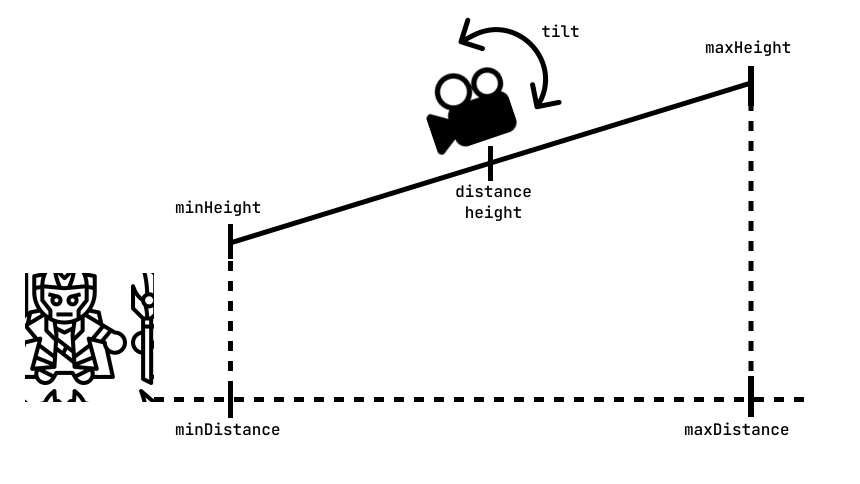
The camera has an initial position defined by height (above the player) and distance (away from the player). The zoom moves the camera forward and backward along a fixed diagonal line defined by minDistance, maxDistance, minHeight, and maxHeight. When the user scrolls the mouse wheel (if zoom is set to true), the camera moves closer to or farther from the target, but only between the limits. This means the camera always stays within a safe range and never gets too close to the object or too far away. The speed of this movement is controlled by zoomSpeed, and the vertical viewing angle is defined by the tilt property. Optionally, you can set minTilt and maxTilt to interpolate the tilt across the zoom range — for example, tilting the camera toward a more top-down angle as the player zooms out to reveal a wider area around the character.
You can use the zoom in any of the target-following modes (thirdPersonFixed, thirdPersonFollow, quarterTurn) to allow players to adjust their view dynamically.
html
<a-entity camera
  game-view="
    target: #character;
    type: thirdPersonFixed;
    zoom: true;

    distance: 5;
    minDistance: 2;
    maxDistance: 20;

    height: 5;
    minHeight: 2;
    maxHeight: 20;

    tilt: -20;
  "
></a-entity>
Keep the starting values aligned with one end of each range
The zoom maps a single progress value (0 → 1) across the whole zoom line, so every range-based attribute moves together. Because of this, the initial distance, height, and tilt you set are not recalculated until the player actually scrolls — they are used exactly as written for the first frame.
To avoid a visible jump on the first scroll, always set each starting value to match the same end of its range — either all the minimum values (fully zoomed in) or all the maximum values (fully zoomed out):
distancemust equalminDistanceormaxDistanceheightmust equalminHeightormaxHeight(the same end asdistance)tiltmust equalminTiltormaxTilt(the same end), when tilt interpolation is enabled
Mixing ends (for example starting at maxDistance but minHeight) places the camera off the zoom line, so the first scroll will snap it back onto the line.
The following example shows an optimal, fully consistent configuration for a thirdPersonFollow camera. The character starts fully zoomed out, so every starting value is set to the maximum end of its range (distance = maxDistance, height = maxHeight, tilt = maxTilt):
html
<a-entity camera
  game-view="
    target: #monster-character;
    type: thirdPersonFollow;
    zoom: true;
    zoomSpeed: 0.1;

    distance: 5;
    minDistance: 4;
    maxDistance: 5;

    height: 20;
    minHeight: 5;
    maxHeight: 20;

    tilt: -70;
    minTilt: -20;
    maxTilt: -70;
  "
  rotation="-30 0 0"
></a-entity>
Props
| Property | Type | Default | Description | Used in |
|---|---|---|---|---|
| target | selector | Specifies the entity that the camera should follow. | thirdPersonFixed, thirdPersonFollow, quarterTurn | |
| height | number | 5 | Sets the vertical height of the camera above the target entity. | thirdPersonFixed, thirdPersonFollow, quarterTurn |
| distance | number | 5 | Defines the horizontal distance between the camera and the target. | thirdPersonFixed, thirdPersonFollow, quarterTurn |
| tilt | number | -20 | Controls the vertical angle of the camera in degrees, tilting it toward the target. | thirdPersonFixed, thirdPersonFollow, quarterTurn |
| type | enum(thirdPersonFixed, thirdPersonFollow, fixed, quarterTurn) | thirdPersonFixed | Selects the camera mode and behavior. | |
| zoom | boolean | false | Enables or disables zooming with the mouse wheel. | thirdPersonFixed, thirdPersonFollow, quarterTurn |
| zoomSpeed | number | 0.3 | Defines how fast the camera moves when zooming in or out. | thirdPersonFixed, thirdPersonFollow, quarterTurn |
| minDistance | number | 2 | Sets the minimum allowed horizontal distance from the target or start position. | thirdPersonFixed, thirdPersonFollow, quarterTurn |
| maxDistance | number | 15 | Sets the maximum allowed horizontal distance from the target or start position. | thirdPersonFixed, thirdPersonFollow, quarterTurn |
| minHeight | number | 2 | Sets the minimum allowed height of the camera. | thirdPersonFixed, thirdPersonFollow, quarterTurn |
| maxHeight | number | 15 | Sets the maximum allowed height of the camera. | thirdPersonFixed, thirdPersonFollow, quarterTurn |
| minTilt | number | — | Camera tilt in degrees when fully zoomed in (at minDistance). Optional; when set with maxTilt, tilt is interpolated across the zoom range instead of staying fixed at tilt. | thirdPersonFixed, thirdPersonFollow, quarterTurn |
| maxTilt | number | — | Camera tilt in degrees when fully zoomed out (at maxDistance). Optional; pairs with minTilt. | thirdPersonFixed, thirdPersonFollow, quarterTurn |
| rotationSpeed | number | 5 | Defines how fast the camera rotates between 90-degree steps. | quarterTurn |
| keyTurnLeft | string | q | Defines the key used to rotate the camera 90 degrees to the left. | quarterTurn |
| keyTurnRight | string | e | Defines the key used to rotate the camera 90 degrees to the right. | quarterTurn |
| position | string | 0 10 0 | Sets the initial position of the camera in the scene. | fixed |
| rotation | string | -20 0 0 | Sets the initial rotation of the camera in degrees. | fixed |
Events
The gameview component emits the following events when the camera changes, so other components can react to the view:
| Event | Parameters | Description |
|---|---|---|
| zoom-changed | { distance: number, height: number, tilt: number } | Emitted when the camera zoom changes (requires zoom). Returns the new camera distance, height, and tilt. |
| view-rotated | { angle: number } | Emitted when the view is rotated by a quarter turn (requires quarterTurn). Returns the new target angle in degrees. |
Note
You can listen to these events to sync UI (such as a minimap or compass) with the camera.
js
el.addEventListener("view-rotated", (event) => {
  console.log(event.detail.angle);
});
Credits & 3D Models Attribution
The project utilizes 3D assets from Poly.pizza. Below is the attribution for each model used in the games.
Creative Commons Attribution (CC BY)
The following models require attribution to the original creator as per the CC BY 3.0 license.
| Model Name | Author |
|---|---|
| Island, Volcano, Paper airplane | Poly by Google |
| Island | J-Toastie |
| Mountain | Servin Nissen |
| Tree Assets | Ben Desai |
Public Domain (CC0)
The following models are provided under the CC0 1.0 license (Public Domain).
| Model Name | Author |
|---|---|
| Demon, Tribal, Yeti, Dragon, Dock, Fox, Rock | Quaternius |